Computing: exercícios de vocabulário A1
12 exercícios de nível A1 (Vocabulário) sobre “Computing”, com respostas. Faça cada atividade e confira na hora. Grátis, sem conta.
Nível de Vocabulário
Antes de começar. 12 exercícios · 2 com áudio. Preencha cada lacuna e depois confira suas respostas.
Exercício 1. Find twelve computing nouns in the wordsearch. Use eight of them to label the pictures below.
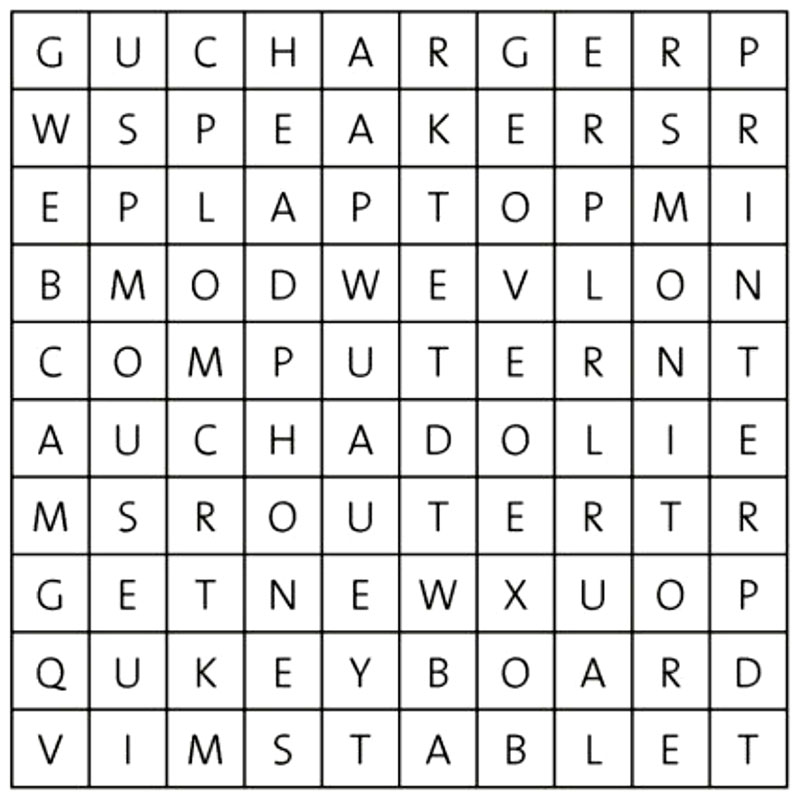
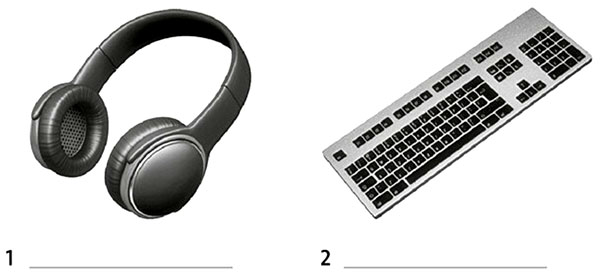
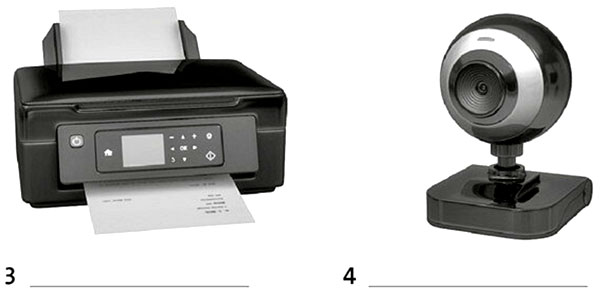
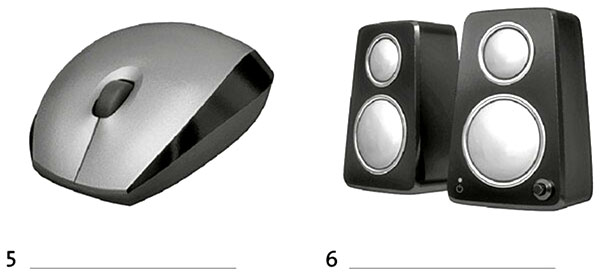
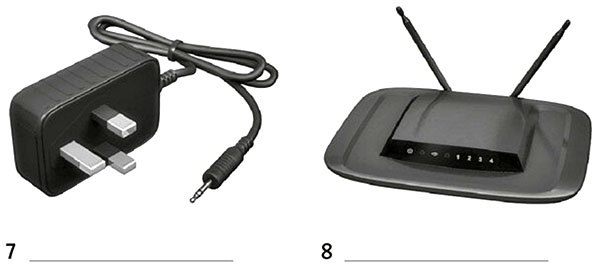
Exercício 2. Complete the explanation below using the other four words from exercise 1.
4 lacunas- To use a 1) , you need a separate keyboard and 2) But a 3) has its own screen and keyboard. A 4) does not have a keyboard. When you need to type, a keyboard appears on the screen.
0 de 4 respondidas
Exercício 3. Put the words in the correct order to make sentences.
6 lacunas- a)document / an / they / scanning / are / important
- b)uploading / he / is / some / photos
- c)contact / her / she / entering / details / is
- d)they / a / downloading / internet / the / from / are / song
- e)comment / posting / a / she / Facebook / on / is
- f)she / photos / deleting / her / from / tablet / is
Exercício 4. Listen to dialogues 1-5. Match them with sentences a-f from exercise 3. There is one extra sentence.
Áudio · 5 lacunasÁudio
| Dialogue | 1 | 2 | 3 | 4 | 5 |
| Sentence (A-F) |
Exercício 5. Listen again. Write the missing word in these sentences.
Áudio · 5 lacunasÁudio
- 1You just need to on the link.
- 2The connection isn’t very good.
- 3I need to it to the Chinese embassy.
- 4Is the full on your tablet?
- 5Whose are you looking at?
0 de 5 respondidas
Exercício 6. Write five sentences about how you use a computer, laptop, tablet or smartphone. Include adverbs of frequency (often, sometimes, never, etc.)
10 lacunas- 1
- 2
- 3
- 4
- 5
Respostas pessoais - esta tarefa não tem gabarito.
Extra exercises
Exercício 7. Match a word from A with a word from B to make computing nouns. Then complete the definitions.
5 lacunas- Ahead key lap memory web
- Bboard cam phones stick stop
- 1A is a set of buttons with letters and numbers that you use to write on a computer screen.
- 2A shows your image to other people over the internet.
- 3are things you put over your ears to listen to music without other people hearing it.
- 4A is a thing you use to copy and store important information.
- 5A is a small computer you can carry around with you.
0 de 5 respondidas
Exercício 8. Complete the sentences with the correct words.
6 lacunas- 1I don’t many comments on social media sites.
- a install
- b post
- c surf
- 2Why don’t you all the files on your computer that you don’t need any more?
- a delete
- b follow
- c upload
- 3I decided to my ole photos to make a digital copy of them.
- a connect to
- b remove
- c scan
- 4You need to your password to log on to the site.
- a enter
- b restart
- c visit
- 5the receipt and take it with you to collect your tickets.
- a Install
- b Print
- c Upload
- 6Do you any famous people on Twitter?
- a scan
- b enter
- c follow
0 de 6 respondidas
Exercício 9. Choose the correct words to complete the sentences.
- How to upload a photo on social media
- 1First of all / Now go to your homepage. 2) Finally / Then, choose the option ‘upload photo’. 3) Next / To start off with, select the photo that you want to upload from your files. 4) After that / Secondly, write a comment about the photo. 5) Finally / Next, click on the ‘post’ button to upload the photo to your homepage, where all your friends can see it.
Exercício 10. Complete the sentences with the words below.
6 lacunas- account
- campaigns
- forums
- media
- page
- story
- 1Companies today are using hashtag to market their products.
- 2What’s the last viral you can remember?
- 3Have you got a Twitter ?
- 4The band opened a fundraising to pay for their European tour.
- 5Do you ever take part in discussions on internet ?
- 6News travels very fast on social
0 de 6 respondidas
Exercício 11. Complete the dialogue with the phrases below.
6 lacunas- Here’s your change and your receipt.
- How much is it?
- How can I help you?
- How would you like to pay?
- That comes to £27.50.
- Would you like anything else?
- CustomerExcuse me?
- Assistant 1
- CustomerI’m looking for a mouse that I can use with my laptop.
- AssistantThis wireless mouse is very popular.
- Customer2)
- AssistantIt’s £9.50.
- CustomerThat’s fine.
- Assistant3)
- CustomerYes, I’m looking for a laptop case, too.
- AssistantDo you like this one? It’s £18.
- CustomerYes, that’s perfect.
- Assistant4)
- CustomerIn cash.
- AssistantOK. 5)
- CustomerHere you are.
- AssistantThank you. 6)
- CustomerThanks very much.
0 de 6 respondidas
Exercício 12. Complete the questions.
5 lacunas- 1What’s the battery of your tablet?
- 2Has your laptop got a built-in you can use for talking on Skype?
- 3Where’s the memory card on this games console?
- 4How many USB has your computer got?
- 5Where can I get a new SIM for my phone?
0 de 5 respondidas
Exercícios de prática relacionados
Ver todos os exercícios de Vocabulário- Are you hungry?10 exercícios
- Clothes11 exercícios
- Daily routine13 exercícios
- Family13 exercícios
Aprenda com aulas
Ouça uma gravação e escreva-a, uma frase por vez
Como praticar
- 1Leia cada pergunta cuidadosamente
- 2Escreva sua resposta ou selecione a opção correta
- 3Clique em “Verificar respostas” para corrigir suas lacunas ou em “Mostrar respostas” para ver o gabarito
- 4Revise quaisquer erros e tente exercícios similares
- 5Passe para o próximo exercício quando estiver pronto