A1
English Vocabulary Exercises for A1 – Computing
12 упражнений
A1 (Начальный) лексика - "English Vocabulary Exercises for A1 – Computing". 12 exercises. Бесплатно, без регистрации.
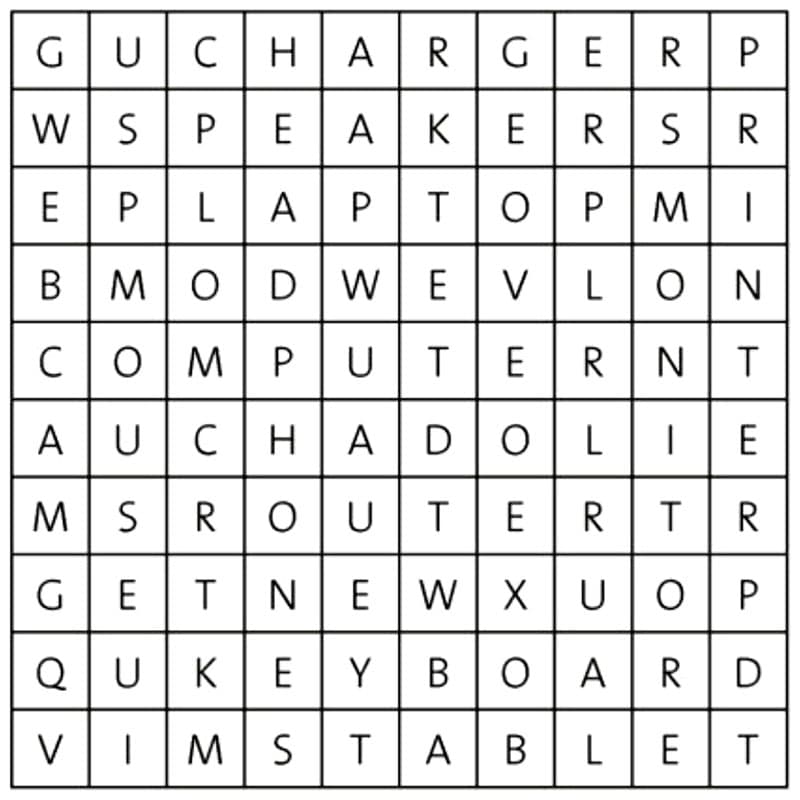
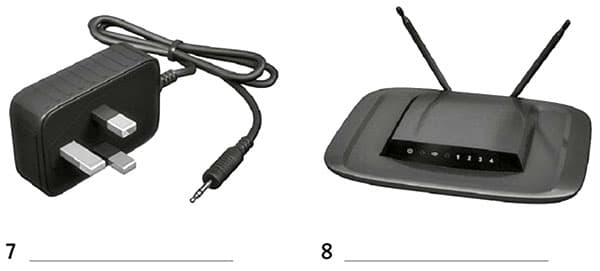
1. Find twelve computing nouns in the wordsearch. Use eight of them to label the pictures below.
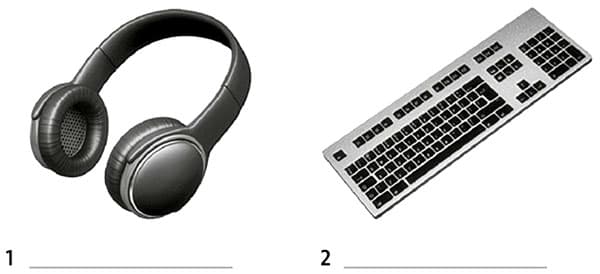
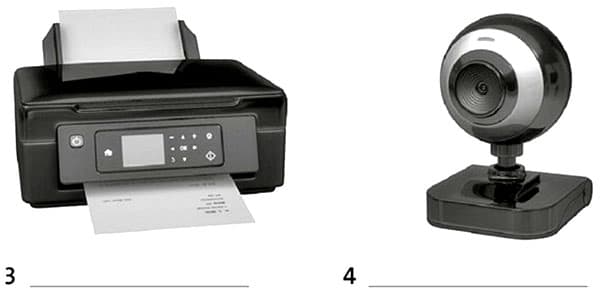
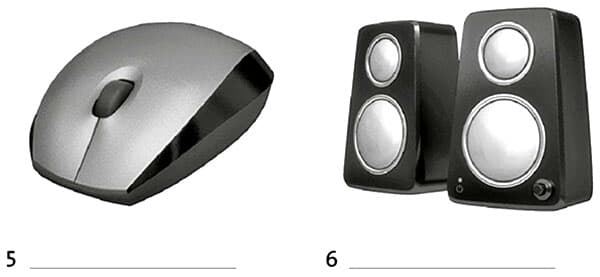
2. Complete the explanation below using the other four words from exercise 1.
- To use a 1) , you need a separate keyboard and 2) But a 3) has its own screen and keyboard. A 4) does not have a keyboard. When you need to type, a keyboard appears on the screen.
3. Put the words in the correct order to make sentences.
- a)document / an / they / scanning / are / important
- b)uploading / he / is / some / photos
- c)contact / her / she / entering / details / is
- d)they / a / downloading / internet / the / from / are / song
- e)comment / posting / a / she / Facebook / on / is
- f)she / photos / deleting / her / from / tablet / is
4. Listen to dialogues 1-5. Match them with sentences a-f from exercise 3. There is one extra sentence.
Audio
| Dialogue | 1 | 2 | 3 | 4 | 5 |
| Sentence (A-F) |
5. Listen again. Write the missing word in these sentences.
Audio
- 1)You just need to on the link.
- 2)The connection isn’t very good.
- 3)I need to it to the Chinese embassy.
- 4)Is the full on your tablet?
- 5)Whose are you looking at?
6. Write five sentences about how you use a computer, laptop, tablet or smartphone. Include adverbs of frequency (often, sometimes, never, etc.)
- 1)
- 2)
- 3)
- 4)
- 5)
Extra exercises
7. Match a word from A with a word from B to make computing nouns. Then complete the definitions.
- A head key lap memory web
- B board cam phones stick stop
- 1)A is a set of buttons with letters and numbers that you use to write on a computer screen.
- 2)A shows your image to other people over the internet.
- 3)are things you put over your ears to listen to music without other people hearing it.
- 4)A is a thing you use to copy and store important information.
- 5)A is a small computer you can carry around with you.
8. Complete the sentences with the correct words.
- 1)I don’t many comments on social media sites.
- a install
- b post
- c surf
- 2)Why don’t you all the files on your computer that you don’t need any more?
- a delete
- b follow
- c upload
- 3)I decided to my ole photos to make a digital copy of them.
- a connect to
- b remove
- c scan
- 4)You need to your password to log on to the site.
- a enter
- b restart
- c visit
- 5)the receipt and take it with you to collect your tickets.
- a Install
- b Print
- c Upload
- 6)Do you any famous people on Twitter?
- a scan
- b enter
- c follow
9. Circle the correct words to complete the sentences.
- How to upload a photo on social media
- 1)First of all / Now go to your homepage. 2) Finally / Then, choose the option ‘upload photo’. 3) Next / To start off with, select the photo that you want to upload from your files. 4) After that / Secondly, write a comment about the photo. 5) Finally / Next, click on the ‘post’ button to upload the photo to your homepage, where all your friends can see it.
10. Complete the sentences with the words below.
- account campaigns forums media page story
- 1)Companies today are using hashtag to market their products.
- 2)What’s the last viral you can remember?
- 3)Have you got a Twitter ?
- 4)The band opened a fundraising to pay for their European tour.
- 5)Do you ever take part in discussions on internet ?
- 6)News travels very fast on social
11. Complete the dialogue with the phrases below.
- Here’s your change and your receipt. How much is it?
- How can I help you? How would you like to pay?
- That comes to £27.50. Would you like anything else?
- Customer Excuse me?
- Assistant 1
- Customer I’m looking for a mouse that I can use with my laptop.
- Assistant This wireless mouse is very popular.
- Customer 2)
- Assistant It’s £9.50.
- Customer That’s fine.
- Assistant 3)
- Customer Yes, I’m looking for a laptop case, too.
- Assistant Do you like this one? It’s £18.
- Customer Yes, that’s perfect.
- Assistant 4)
- Customer In cash.
- Assistant OK. 5)
- Customer Here you are.
- Assistant Thank you. 6)
- Customer Thanks very much.
12. Complete the questions.
- 1)What’s the battery of your tablet?
- 2)Has your laptop got a built-in you can use for talking on Skype?
- 3)Where’s the memory card on this games console?
- 4)How many USB has your computer got?
- 5)Where can I get a new SIM for my phone?
Как практиковаться
- 1Внимательно прочитайте каждый вопрос
- 2Напишите свой ответ или выберите правильный вариант
- 3Нажмите 'Показать ответ' для проверки
- 4Изучите ошибки и попробуйте похожие упражнения
- 5Переходите к следующему упражнению, когда готовы
Связанные практические упражнения
Учитесь с уроками
Создайте основу с аудио- и видеоуроками