B2
Listening Exercises B2 – Socializing
9 exercícios
B2 (Intermediário superior) compreensão auditiva - "Listening Exercises B2 – Socializing". 9 exercises. Grátis, sem cadastro.
1. Listen and complete these expressions you can use to start a conversation.
Audio
- a)What to at the weekend?
- b)How’s ?
- c)Did you last night?
- d)It’s , hasn’t it?
- e)So, how ?
- f)Wow!
2. Listen and match each response (1-6) with a conversation starter (a-f) in Exercise 1.
Audio
- 1)2) 3) 4) 5) 6)
3. Use Up/Down Arrow keys to increase or decrease volume.
Audio
- 1)Kerri, from Ireland, is at a party in a friend’s home. Listen to two conversations (A and B) she has with people she meets. Circle the correct answer.
- Who
- a)talks about himself? Tim / Nick
- b)responds to information? Tim / Nick
- c)doesn’t ask questions? Tim / Nick
- d)shows interest? Tim / Nick
- e)asks lots of questions? Tim / Nick
4. Use Up/Down Arrow keys to increase or decrease volume.
Audio
5. Listen and complete conversation a and b
Audio
- Emma: Oh no. It’s !
- Tony: Great. I was going to this afternoon.
- Julie: It said on the news that are going to fall.
- Frank: Really? That’s great. I’ve just bought a
6. Look at each conversation again and tick your answers.
- a How do Tony and Frank both feel?
- pleased ◻ relieved ◻ disappointed ◻ excited ◻
- b When they say Great / That’s great, what do they mean?
- ‘How wonderful!’ ◻
- ‘Oh no. That’s terrible!’ ◻
- ‘I’m not interested.’ ◻
7. Now listen to three more conversations and match each conversation (a-c) to one of the pictures (1-3) below.
Audio
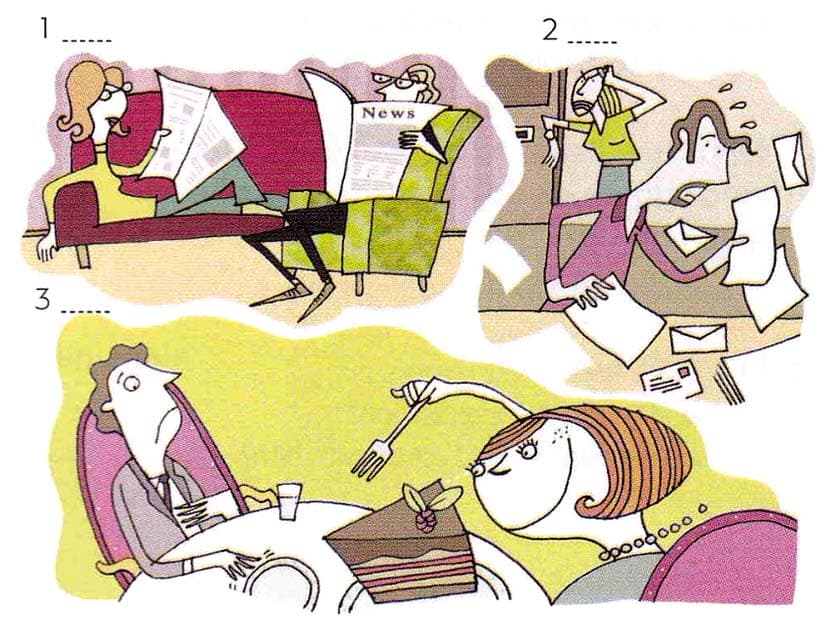
8. Listen again and match each expression you hear with a conversation.
Audio
- What a pity!
- That’s marvellous!
- How exciting!
- Conversation a
- Conversation b
- Conversation c
9. Listen again. What does each speaker really mean?
Audio
- a I’m pleased about that.
- b How boring!
- c What a disaster!
- What a pity!
- That’s marvellous!
- How exciting!
Como praticar
- 1Leia cada pergunta cuidadosamente
- 2Escreva sua resposta ou selecione a opção correta
- 3Clique em 'Mostrar Resposta' para verificar seu trabalho
- 4Revise quaisquer erros e tente exercícios similares
- 5Passe para o próximo exercício quando estiver pronto
Exercícios de prática relacionados
Aprenda com aulas
Construa sua base com aulas de áudio e vídeo